


Banking is becoming easier every new day – drastically distancing clients away from banking halls to their convenience. Innovations like paperless account opening, cashless payments, and agent banking are making it easier for the unbanked community to embrace the system and catch up with those already on board.
The latest keyboard innovation from Standard Chartered Bank speaks volumes of how much the brand is advancing in terms of technology. The latest SC Keyboard lets you do your banking straight from your keyboard without having to switch to the bank’s mobile app.
SC Keyboard is available for both Android and iOS. Whoever installs the SC mobile app gets the SC Keyboard, and with it you won’t have to switch from a messaging app to complete a banking transaction. The keyboard enables you to view your account balances, top-up airtime, pay all your utilities and transfer mobile money to any registered MTN Uganda and Airtel Uganda mobile numbers.

How to setup the SC Keyboard
To enable it as your device’s default keyboard, simply head over to device settings— on the keyboard and input settings, with the Standard Chartered mobile app installed on your phone. You can do this by checking under Language and Input settings, then Virtual Keyboards, then to Manage Keyboard under settings.
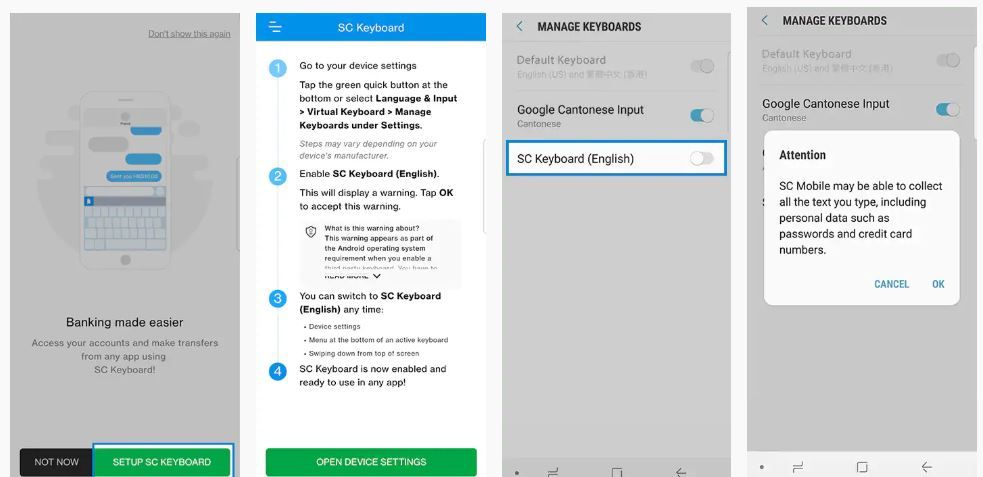
These steps vary for the variety of devices however, when you once you see the SC Keyboard available, tap it and agree to the note that pops up.
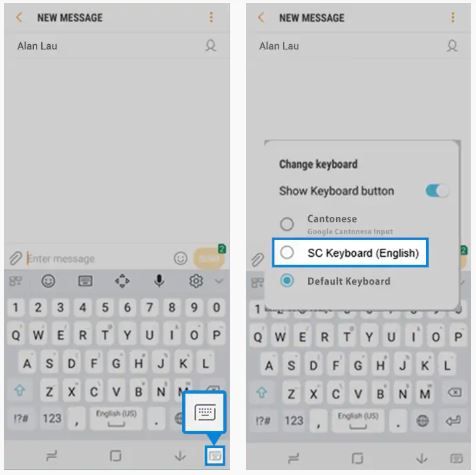
Once you have enabled it, you can always use it whenever you want to make transactions. You can switch to it from either device settings, from the menu at the bottom of an active screen, or by swiping down from top of your screen.


