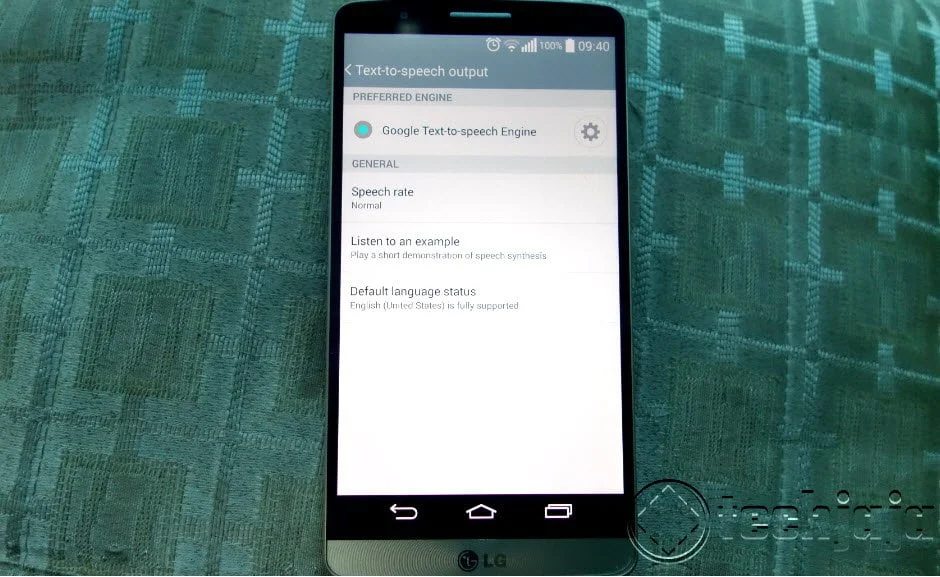
How to Alter the voice in your Android Phone

What? My Android Phone has a voice? Yes it does, and for those who need a digital voice companion to help them navigate around their Android phone’s menus worry not we’ve got you covered. Am sure some people get tired of hearing that robotic voice.  This feature is mainly used by the visually impaired but we are sure there are some of you who would want to try it out for fun. So if you are considering to alter this voice, we here is how it can be done.
  1. Go to settings
  2. If your phone has Accessibility, go to the Text To Speech Option
  3. To change voice you can tap on the gear but if you want a more natural text to speech synthesis, choose Google text to the speech engine.
  4. You can also download other speech to text engines from the Google Play that will allow for more voices and languages. Samsung has one it uses for its voice recognition, it’s worth a try but Google’s text to speech engine is better.


- Advertisement -

IN THIS STORY STREAM

Farooq Gessa Mousal
Farooq Gessa Mousal
Techjaja: CTO
/** * RECOMMENDED CONFIGURATION VARIABLES: EDIT AND UNCOMMENT * THE SECTION BELOW TO INSERT DYNAMIC VALUES FROM YOUR * PLATFORM OR CMS. * * LEARN WHY DEFINING THESE VARIABLES IS IMPORTANT: * https://disqus.com/admin/universalcode/#configuration-variables */ /* var disqus_config = function () { // Replace PAGE_URL with your page's canonical URL variable this.page.url = PAGE_URL; // Replace PAGE_IDENTIFIER with your page's unique identifier variable this.page.identifier = PAGE_IDENTIFIER; }; */ (function() { // REQUIRED CONFIGURATION VARIABLE: EDIT THE SHORTNAME BELOW var d = document, s = d.createElement('script'); // IMPORTANT: Replace EXAMPLE with your forum shortname! s.src = 'https://thetechjaja.disqus.com/embed.js'; s.setAttribute('data-timestamp', +new Date()); (d.head || d.body).appendChild(s); })();Please enable JavaScript to view the comments powered by Disqus.

Fresh Tech

- Advertisment -