

Google dropped a quiet but potentially game-changing update last week: you can now record a short video of your face and use it later to claw your way back into a locked Google Account. No password. No recovery code. Just you, looking at the camera and turning your head on command.
The feature, simply called “selfie video,” went live on July 23. In the official announcement, Google framed it as another practical way to stay connected to the photos, emails, documents, and everything else sitting inside your account when the usual routes fail. Forget your password on a work trip. Lose your phone. Get locked out after a suspicious login attempt. Instead of starting the dreaded recovery process that sometimes ends in permanent lockout, you record a fresh short clip of yourself and the system checks it against the one you saved earlier.
How the Selfie Video actually works
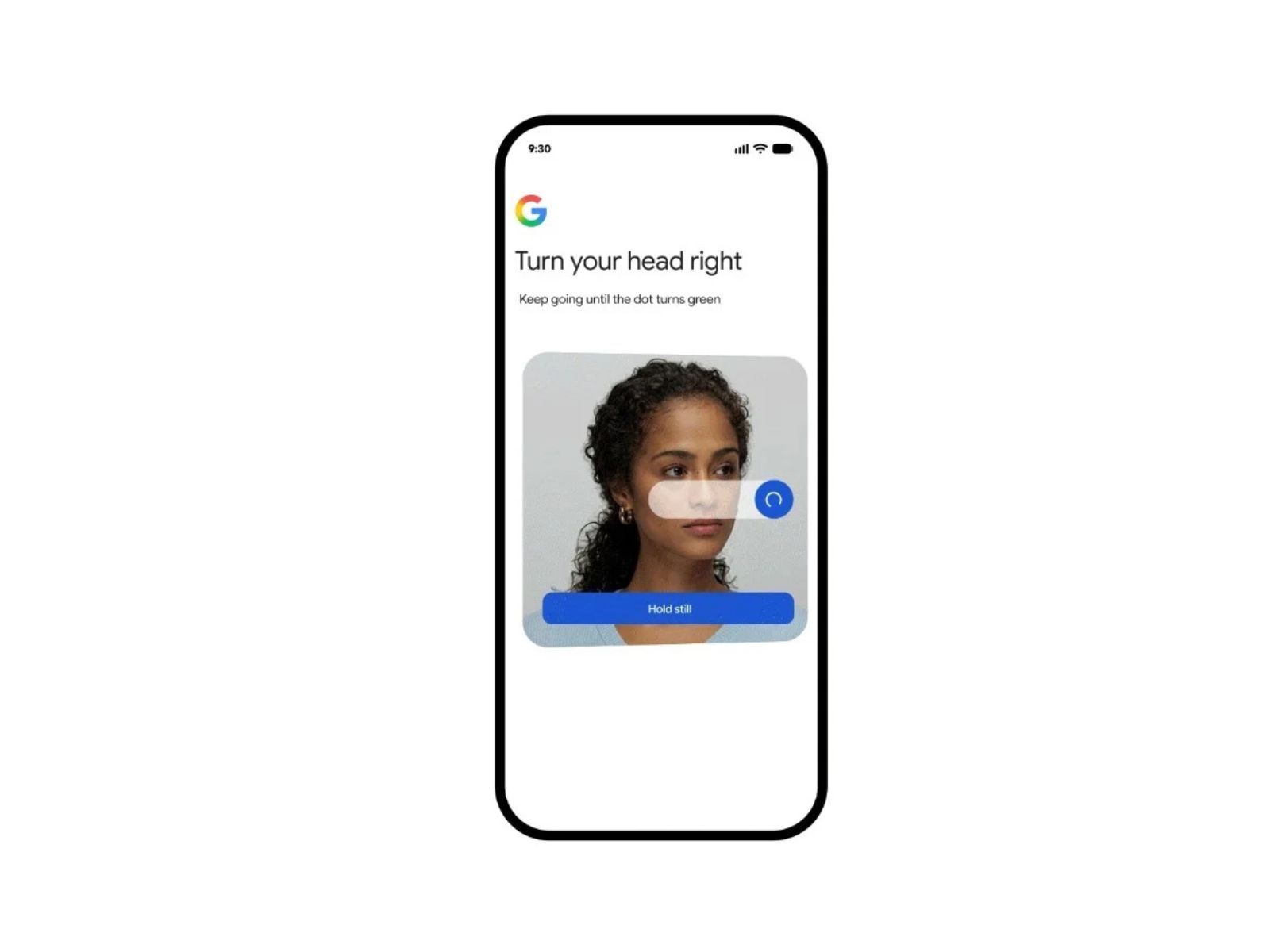
While you’re still signed in, you head to Security & sign-in in your Google Account settings and choose the selfie video option. The app asks you to face the camera and follow simple on-screen prompts: turn your head right until a progress bar turns green, hold still, then return to center. The whole thing takes less than a minute. The video captures multiple angles of your face so the system has something solid to compare against later. If you’re on a computer without a camera, it generates a QR code so you can finish the recording on your phone.
The next time you’re locked out and other recovery methods aren’t working, Google can offer the selfie option. You film a new short clip following similar guided movements. The company says it matches the new recording against the stored one, runs liveness checks to confirm a real person is in front of the camera, and applies its usual fraud-detection systems. If everything lines up, you’re back in.
The security pitch Google is making
Google is careful to stress the security layers. The system requires those head movements specifically to make deepfakes and static photos harder to pass off. The stored video is encrypted even when it’s sitting idle. You can delete it whenever you want from the same settings page. By default, the company says the video is used only for helping you sign in. There’s an optional toggle if you want to let Google use the data to improve facial recognition and verification tools more broadly, but you can leave that off.
Not everyone will see the option right away. It’s rolling out gradually and isn’t available for Google Workspace accounts, children’s accounts, or anyone enrolled in the Advanced Protection Program. You also can’t set it up once you’re already locked out—so the window to enroll is while things are still working normally. Some users who tested early versions in places like Brazil reported the process felt straightforward, though a few noted the usual camera-permission and lighting headaches that come with any face-based tech.
The privacy questions that come with it
Privacy-conscious users are already raising the obvious questions. Handing over a video of your face—even an encrypted one—feels different from storing a phone number or email address. Google insists users stay in control and can wipe the data at any time, yet the mere existence of a biometric file on company servers makes some people uneasy. Others point out that similar face-verification tools already exist across banking apps, government portals, and social platforms. The difference here is scale. Google Accounts touch billions of people.
This isn’t Google’s first attempt at making account recovery less painful. Passkeys, recovery contacts, and backup codes have all been pushed in recent years for the same reason: too many people lose access to accounts that hold years of personal history. Selfie video sits alongside those tools rather than replacing them. Google still recommends layering multiple methods. A face recording is convenient when you’re traveling or your phone dies, but it won’t help if the lighting is terrible or your appearance has changed dramatically since you enrolled.
Why this could matter more than it first appears
There’s also a practical upside that gets less attention. Account lockouts remain one of the most common frustration points in consumer tech. Support forums are full of people who lost access after a phone upgrade, a forgotten password, or a hijacking attempt that left them stranded. A well-designed biometric fallback could cut down on those permanent losses, especially for users who never bothered setting up recovery options in the first place.
Whether this becomes a widely used safety net or just another underused setting remains to be seen. Early reaction on social media mixed curiosity with the expected skepticism about any new face-scanning tool. Password managers and privacy advocates are watching closely to see how the matching accuracy holds up in real-world conditions and whether the optional data-sharing prompt stays truly optional.
If your account is eligible, the setup link is already live. It takes almost no time, and once the video is saved you can forget about it until the day you actually need it. That day may never come. Or it might arrive at the worst possible moment—airport, hotel, late at night—when every other recovery path has already failed.


