

Now that VPN usage has become second nature to most of us, perhaps it is time we start dipping our feet in more features your VPN can do for you. Let’s start with VPN Slipt Tunneling. It should be noted that not all VPN providers can support this feature and it is mainly offered as a premium feature. Is it worth it? Let’s find out more.
A basic VPN routes all your internet traffic through an encrypted tunnel to protect your data from hackers and third-party snoops. Most VPN apps we use don’t support split tunneling, and in that case, you may run into situations where: You can’t access foreign and local internet services at the same time, Transmitting all data through the VPN uses up your data bundle and finally, you can’t access Local Area Network (LAN) devices while you’re connected to the VPN.
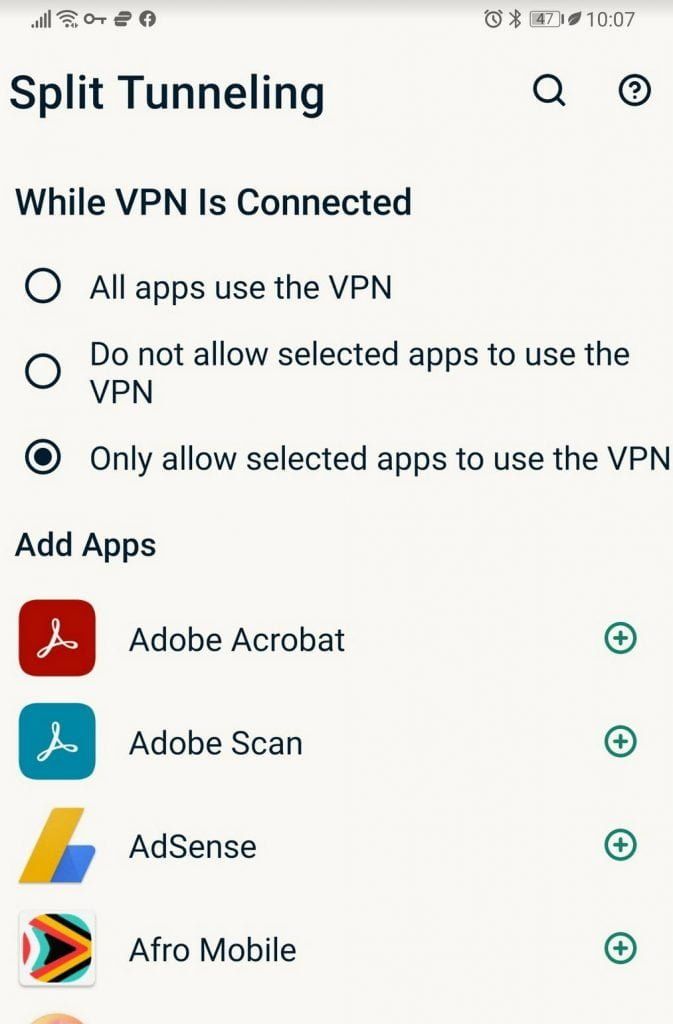
But with a split-tunneling VPN, you can: Stream foreign movies like Netflix or ShowMax while using web services from local IP addresses. You can download safely without slowing down your other web activities; this means you can save your data bundles by selecting apps that you want to go through the VPN (as shown below). Finally you can access your network printer while surfing the internet securely.

It should be noted that if you set up split tunneling to exclude certain traffic from the protection of your VPN, your internet service provider or a third party could access that traffic.
To protect your online activity, use only VPN-protected connections when you handle sensitive data, banned sites, downloads, or torrents. Using this feature depends on how your VPN provider has implemented it, the basics remain the same
For example, if you want all of your apps except say YouTube to use the VPN, you can configure your VPN to “split-tunnel” the traffic so that only YouTube won’t go through the encrypted VPN tunnel. This helps you to set up only those apps that you want to pass through the VPN that way you can save on some data since VPNs are known to use a small amount of your internet data resources.
In most cases, you must be disconnected from the VPN to change your split-tunneling settings, and then you can select different split-tunneling options that suit your needs.


