
Do you ever sit to use your PC and all a sudden it can’t bring any sound or its wifi connectivity starts misbehaving? This in most cases happens because of a lack of driver updates.
A driver typically communicates with the device through the computer bus or communications subsystem to which the hardware is connected making it so pivotal for a computer’s normal operation. System instability, malfunctioning hardware, unresponsive hardware, and computer errors are some signs that your drivers aren’t working well.
Drivers on Windows 10, along with many devices, such as network adapters, monitors, printers, and video cards, are automatically downloaded and installed through Windows routine Updates. You probably already have the most recent drivers, but if you’d like to manually update drivers or reinstall a driver, here’s how
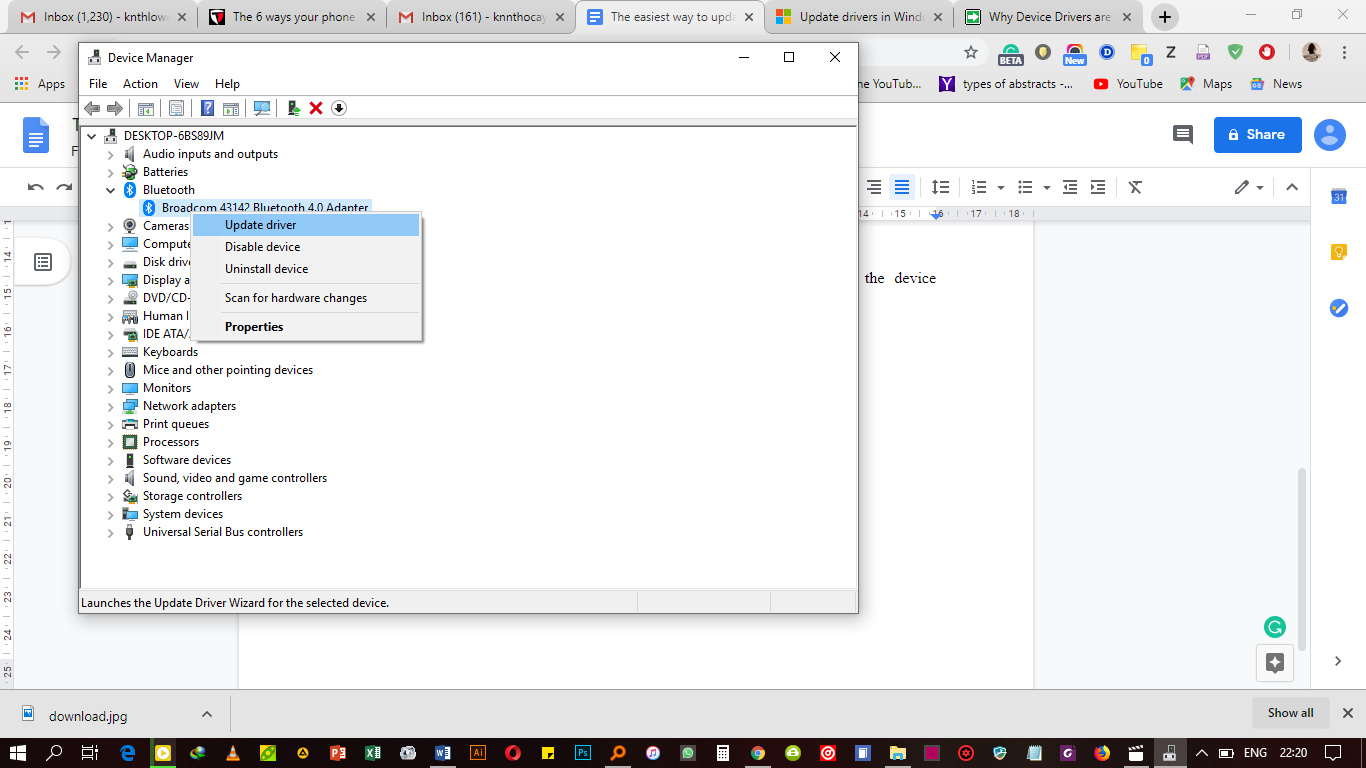
Updating using the device driver ( Windows 10)
In the search box on your taskbar, search for device manager, then select Device Manager.
- Choose a category to see names of devices, then right-click (or press and hold) the one you’d like to update.
- Search automatically for updated driver software.
- Select Update Driver.
Updating using a driver utility software (Windows 7, 8 and 10)
You can also keep all the drivers on your computer up to date by using one of the secondary driver utility software, that you can download over the internet. These are quite many but a notable one I have used for a while and helps just perfectly is called the driver booster app. Visit iobit and download the software. There are plenty of various driver utilities you can try.
After downloading this app, run its setup and install it. Click on scan and then wait for the program to scan your computer. The program scans your computer for outdated drivers automatically.
After the scan is complete, you will be able to see the outdated drivers. You can then choose the ones to update or update all at once. The beauty with the driver booster is that it contains a database of over 3,000,000 drivers and game components. It can even identify missing drivers and ones that are up to date but faulty.

After all your drivers have been updated, reboot your pc -and you are good to go. Do not complain about drivers yet you can update them in an instant, just borrow a leaf.

