


In 2019, Meta-owned WhatsApp announced that they would give users the ability to receive and send messages via PC without the need to touch their phones. Today, you need to have WhatsApp installed on your phone and the device must have internet connectivity.
Now, the company released a desktop version that allows users to use the platform even when the phone is not connected to the internet. Without the need to have your phone connected to the internet, you can save your data from the apps running in the background as well as ensure that your activity does not in any way depend on the state in which your phone is.
The new feature will be able to support at least four devices that can be linked to one phone. You will still be able to use WhatsApp Web, Desktop, and Portal even when the main phone didn’t have an active internet connection. However, if the main device remains disconnected for over 14 days, the linked devices will be automatically logged out.

How to use WhatsApp Web with no smartphone
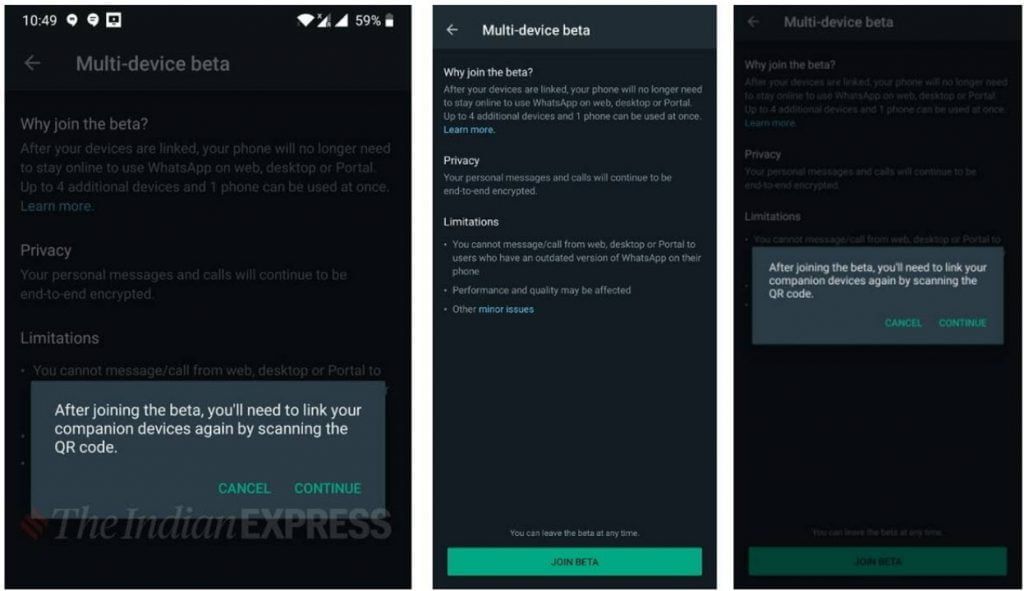
You are required to link your device to the Web, Desktop, or Portal at the initial stage, after which you will be able to use WhatsApp without connecting your smartphone. Here’s a quick look at how you can do that.
Step 1: Open WhatsApp on your phone and tap on the three-dotted icon, which is located on the top right corner of the screen.
Step 2: Tap on “Linked devices” and then tap again on “Multi-device beta.” WhatsApp will then display a page, which explains the limitations of the feature and other things.
Step 3: Now, tap on the “Join Beta” button and press on the “Continue” button. Once done, you simply need to link your smartphone to WhatsApp Web by scanning the QR code.
Some features won’t be able to work on these linked companion devices for example the ability to view live location on companion devices. The multi-device beta feature also doesn’t support messages with link previews from WhatsApp Web and creating/viewing a broadcast list on companion devices.


