

Millenials have heinous typing behavior. Keyboard App makers do not include every jargon, argot, patois, slang or parlance used by these atrocious typers all over the world. If auto correct isn’t disabled, you should be prepared to face continuous annoyance every time your keyboard tries to ‘correct’ your jargon. Turning off the Auto correct feature is the best call especially if your native language isn’t English. However, Auto Correct can also save you from silly blunders as you try to keep up with a fast moving group chat. But how do you disable auto correct on an Android smartphone, if you really want to?
How to disable auto correct and predictive text on Android.
Android OS is loved for full customization. A little adjusting of the settings and you are hitting the home run. Still, some people find it hard to make a few clicks in the settings panel. Keep calm, we are going to show you how.
- Open the Settings panel in your phone.

- Go to system
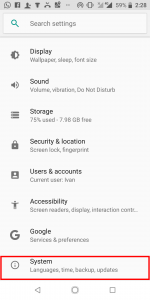
- Go to Language and Input.
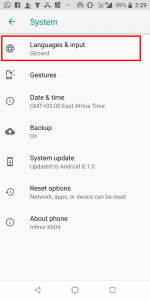
- Locate your active virtual Keyboard and tap its name or gear icon next to it. In my case it’s the Google Keyboard.
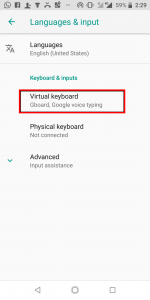
- Select Text correction.
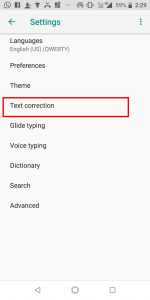
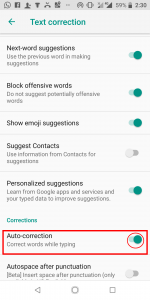
- In the next window, Un-check or toggle off show word predictions. You can also disable Auto-correct here or change its frequency to mild, aggressive or moderate.
Auto correct FAQ.
Do these steps differ If I’m using an older version of Android?
Yes of course, but not that much. An apple does not fall far from its tree. You can still easily figure out how to pull off this tutorial if you have an older Android Version. However, consider upgrading your device for better functionality.
That’s it for today! We have previously shared many tricks that will help you fully customize of your Android device and get more out of apps. Keep it techjaja and we shall be sharing more of these.


