


This is perhaps one of the most anticipated features on WhatApp, thanks to Senior XDA member, mohamedrashad has shared a guide through which you can enable call activity on WhatsApp on your Android phone, even though you have not received an invitation for WhatsApp calling feature.
Unlike the older method, in this new method you do not have to root your Android smartphone to enable the feature. And with this method the call activity will be made your home for WhatsApp forever. But you need to have some basic knowledge about decompiling and editing xml files.
Check out the following guides if you wish to get WhatsApp call activity on your non-rooted smartphone. WhatsApp still has not announced the voice calling feature officially on its website or the release notes on Google Play. No one said it could easy especially method 2, but if really feel you want to try it out before the official version is released follow the steps below.

Method 1
To activate the feature, all you need is the latest version (v2.11.561) of WhatsApp (via APKMirror) and a WhatsApp call from someone who already has the feature. After you get the call, you will see WhatsApp’s interface switch from just showing recent chats to three tabs – calls, chats and contacts.
Method 2
Requirements
- Latest WhatsApp apk
- ApkTool
- Notepad++
Download link: WhatsApp 2.11.508.apk
How to get WhatsApp call activity on your smartphone [Without root]
Step 1: Decompile WhatsApp
Step 2: Open AndroidManifest.xml
Step 3: Search for the following code [Head over to the development thread for the codes]
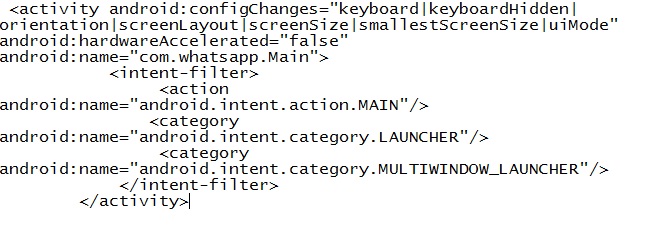
Step 4: Change it to

Step 5: Now search for this line

Step 6: Change it to
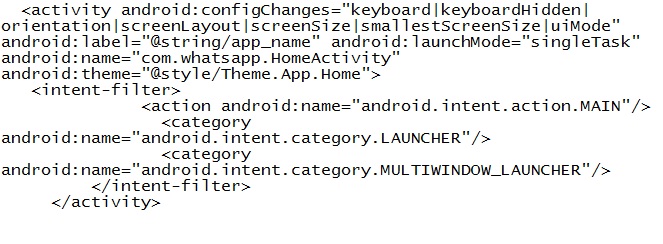
Step 7: Compile and sign
Step 8: Uninstall the old WhatsApp
Step 9: Install the modified version
And you are done. You should now be having calling feature enabled on your WhatsApp.


